Release Notes Fiction: Why Your Jira Fix Version Doesn't Match What Actually Shipped
Your release notes list 9,860 changes. Only 71% had merged code by the release date, and a quarter of the merged code is listed nowhere. Learn what engineering leaders on Reddit say about Jira Fix Versions, release scope and untracked changes at enterprise scale, and how Keypup MCP reconciles each version's scope with linked, merged pull requests.
TL;DR: In most enterprise organizations, the Jira Fix Version is the official record of what a release contains. Release notes, customer announcements, change records and audit evidence are all generated from it. But the Fix Version records what someone planned, not what was merged. Reconciled with the code, a typical version has only about 70% of its listed issues merged by the release date, while a quarter of the merged pull requests are listed in no version at all. That's release notes fiction. The Keypup MCP Server reads each Jira issue's Fix Versions, with their release date and released flag, its type, priority, status and creation date, and the merge date, state, review state, build status and mergeability of the pull requests linked to it, plus every merged pull request's repository and target branch. Your AI assistant can then measure how much of each version was really merged on time, how late the rest arrived, which releases and product lines drift most, where untracked code comes from, and what the next release will really contain.
The release notes for version 8.3 went out on Tuesday: 214 items, including the fix for the export bug that two enterprise customers had escalated. On Thursday, one of those customers reported the bug again. The fix was listed in 8.3 in Jira. Its pull request merged the following Monday, three business days after the release was cut. Meanwhile, a change to the shared authentication library that shipped in 8.3 appeared in no release note at all, and it caused the incident on Friday.
The Friction: The Fix Version Records Intent, Not Code
At enterprise scale, the Fix Version is set and maintained by people, while the code moves through Git on its own schedule. They drift apart for structural reasons:
The Fix Version is set at planning time. An issue is tagged for 8.3 when it's planned. If its code slips, someone has to remember to move it to 8.4. Often nobody does, and the version is "released" in Jira with the issue still in it.
Releases are cut by date, not by scope. Release trains leave on schedule. Whatever isn't merged when the branch is cut misses the train, but the release notes are generated from Jira, not from the branch.
Last-minute additions skip planning. Issues created a few days before the release go straight into the version, often with the least time to get through review and CI.
Code with no ticket is invisible. Infrastructure changes, shared library updates and "quick fixes" merged without a Jira key end up in the release but in no version, no release note and no change record.
The result: a release record that is wrong in both directions. It lists changes that didn't ship, and misses changes that did.
Why This Matters: The Real Cost of Release Notes Fiction
The Customer Problem
When release notes announce a fix that isn't in the build, customers test it, find the bug again, and escalate. Support and account managers lose credibility with every "it's in the next release, actually".
The Audit Problem
In regulated environments, the Fix Version is often the evidence trail: which change shipped in which release, and who approved it. A version that lists unmerged work, and misses merged work, is evidence that doesn't match the code an auditor can inspect.
The Incident Problem
When a release causes an incident, on-call engineers start with the release notes. If a quarter of the merged code isn't listed, the change that caused the problem is often the one they can't see.
The Enterprise Discussion: What Engineering Leaders Are Actually Saying
"Our release notes are aspirational", "fixVersion is set at sprint planning and never touched again" and "half of what broke prod wasn't in the release notes" come up again and again wherever release managers, engineering managers and SREs compare notes. The quotes below are representative of recurring threads on r/ExperiencedDevs, r/devops, r/jira and r/EngineeringManagers.
Release Manager, Enterprise SaaS (r/devops)
"Our release notes come straight from the Jira fixVersion. Every release, I find tickets in there whose PRs are still open. Nobody moves them to the next version, so the notes say we shipped things we didn't."
"The audit question is simple: show me every change in release X and its ticket. We can't, because a chunk of what gets merged, especially in the platform repos, never references a ticket at all."
Staff SRE, E-commerce (r/sre)
"The incident was caused by a change to a shared library that wasn't in the release notes. We spent two hours reading the notes looking for the culprit. The notes were the problem."
The pattern holds: organizations use the Jira Fix Version as the record of what shipped, but nothing checks it against the code that was actually merged, in either direction.
How Keypup MCP Reconciles Release Scope With Merged Code
The Keypup Model Context Protocol (MCP) Server gives your AI assistant structured access to the data Keypup imports from Jira and from GitHub, GitLab, Bitbucket and Azure DevOps. For this analysis, what matters is that each Jira issue carries its Fix Versions, each with a name, release date and released flag, as well as its issue type, priority, workflow status, creation date and assignee. For the pull requests linked to it, Keypup provides their merge date, state, review state, build status and mergeability, and for every pull request, its repository, target branch and size.
Two conventions make the analysis possible. A product line is a Jira project with its own versions; the assistant maps repositories to product lines from a list you give in the prompt. A release window runs from a product line's previous release date to the current one. "Merged by the release date" means the last pull request linked to the issue merged on or before the version's Jira release date. All figures cover versions released in the last 12 full months, November 2025 to October 2026, for an organization of around 1,200 engineers with six product lines.
1. Checking Whether the Fix Version Matches What Was Merged
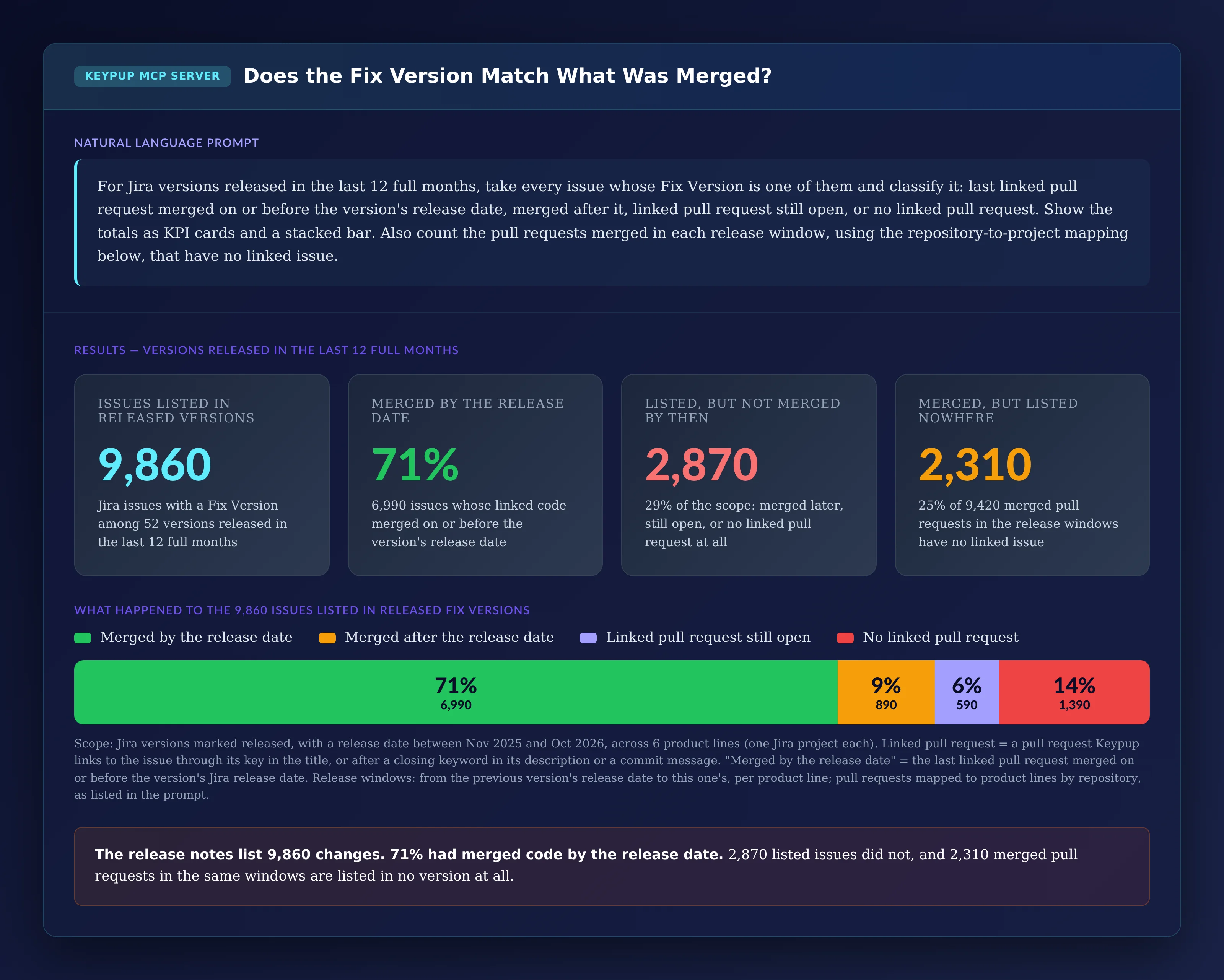
The first question: of everything a release says it contains, how much had merged code by the release date, and how much merged code is listed nowhere?
MCP Prompt:
For Jira versions released in the last 12 full months, take every
issue whose Fix Version is one of them and classify it: last linked
pull request merged on or before the version's release date, merged
after it, linked pull request still open, or no linked pull request.
Show the totals as KPI cards and a stacked bar. Also count the pull
requests merged in each release window, using the repository-to-
project mapping below, that have no linked issue.
Output: Does the Fix Version Match What Was Merged?
Key Insight: The release record is wrong in both directions. 2,870 issues listed as shipped had no merged code by the release date, and 2,310 merged pull requests in the same windows appear in no version. Of the 1,390 listed issues with no linked pull request, some are legitimately code-free (documentation, configuration, duplicates), but every one of them still appears in the release notes.
2. Tracking Whether Release Scope Is Getting More or Less Accurate
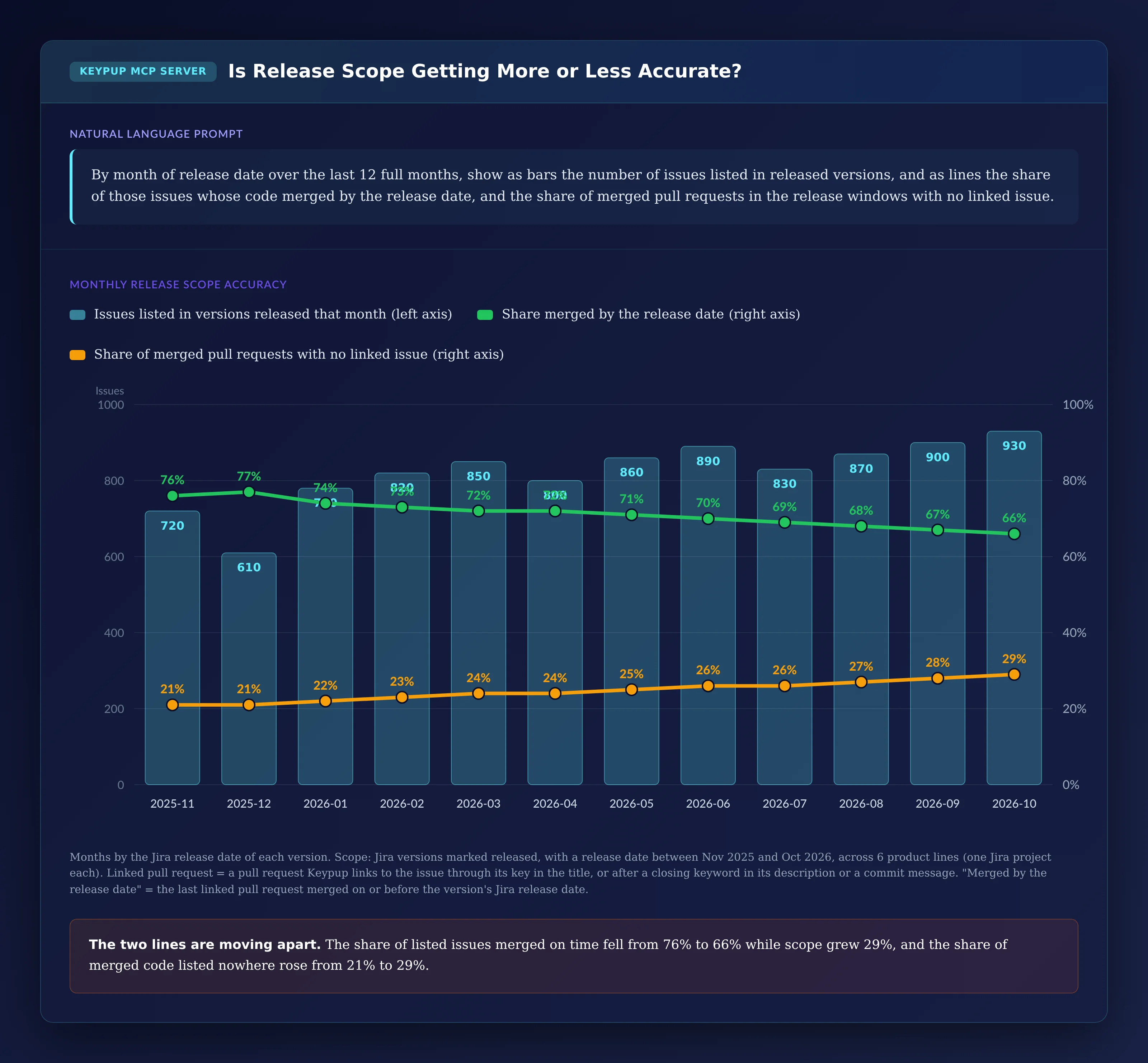
One year of totals can hide a trend. A monthly view shows whether release scope is drifting as the organization grows.
MCP Prompt:
By month of release date over the last 12 full months, show as bars
the number of issues listed in released versions, and as lines the
share of those issues whose code merged by the release date, and the
share of merged pull requests in the release windows with no linked
issue.
Output: Is Release Scope Getting More or Less Accurate?
Key Insight: The two lines are moving apart. As listed scope grew 29%, the share merged on time fell from 76% to 66%, and the share of merged code listed nowhere rose from 21% to 29%. More is being promised, less of it is landing on time, and more of what lands is untracked.
3. Finding Which Releases Drift Furthest From Their Scope
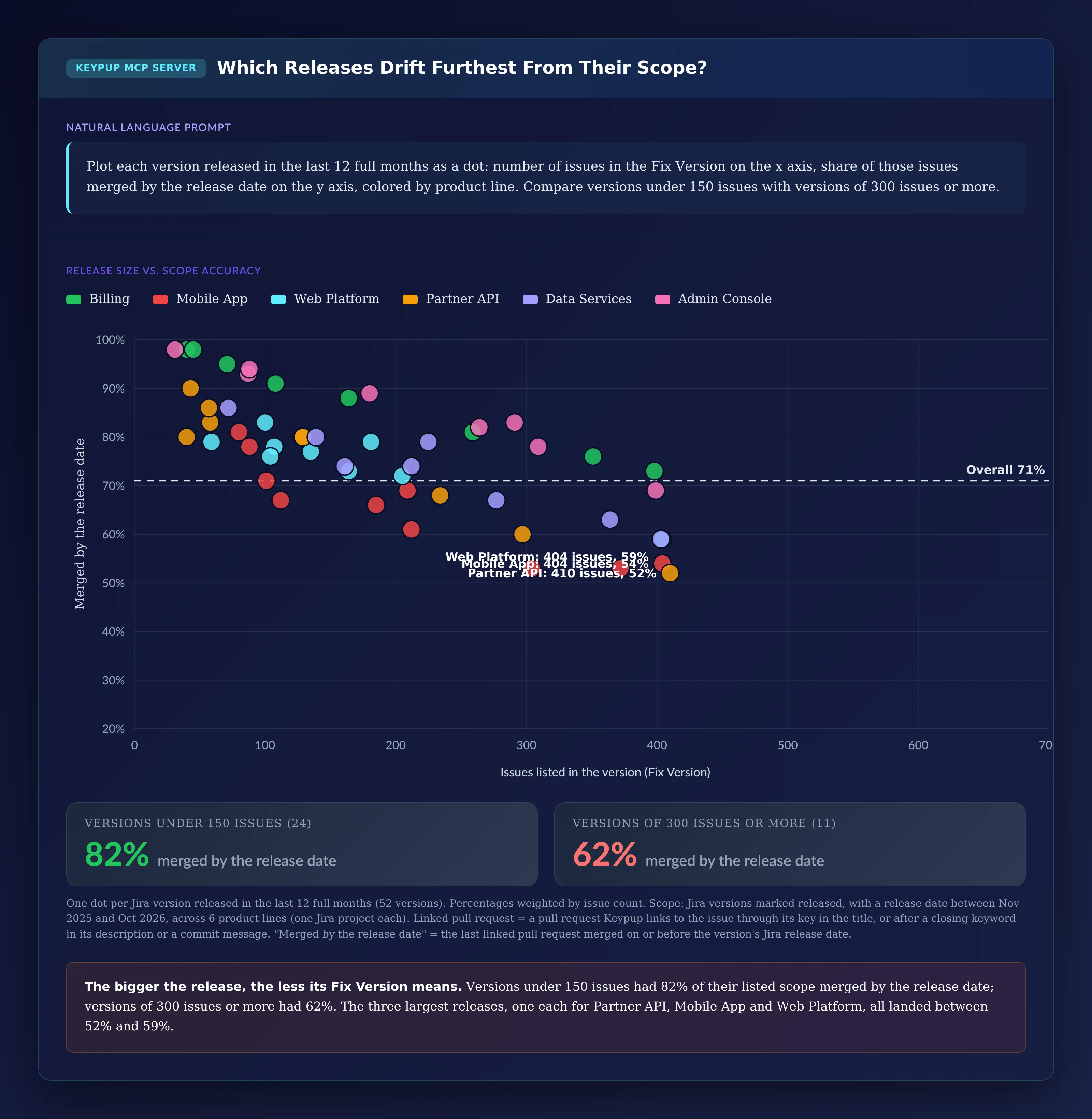
Not every release drifts the same way. Plotting each version by size shows whether the problem is a few teams or the way releases are scoped.
MCP Prompt:
Plot each version released in the last 12 full months as a dot:
number of issues in the Fix Version on the x axis, share of those
issues merged by the release date on the y axis, colored by product
line. Compare versions under 150 issues with versions of 300 issues
or more.
Output: Which Releases Drift Furthest From Their Scope?
Key Insight: The bigger the release, the less its Fix Version means. Versions under 150 issues had 82% of their scope merged by the release date; versions of 300 issues or more had 62%. Large versions are where scope is set furthest in advance and revisited least.
4. Measuring How Late the "Released" Code Arrived
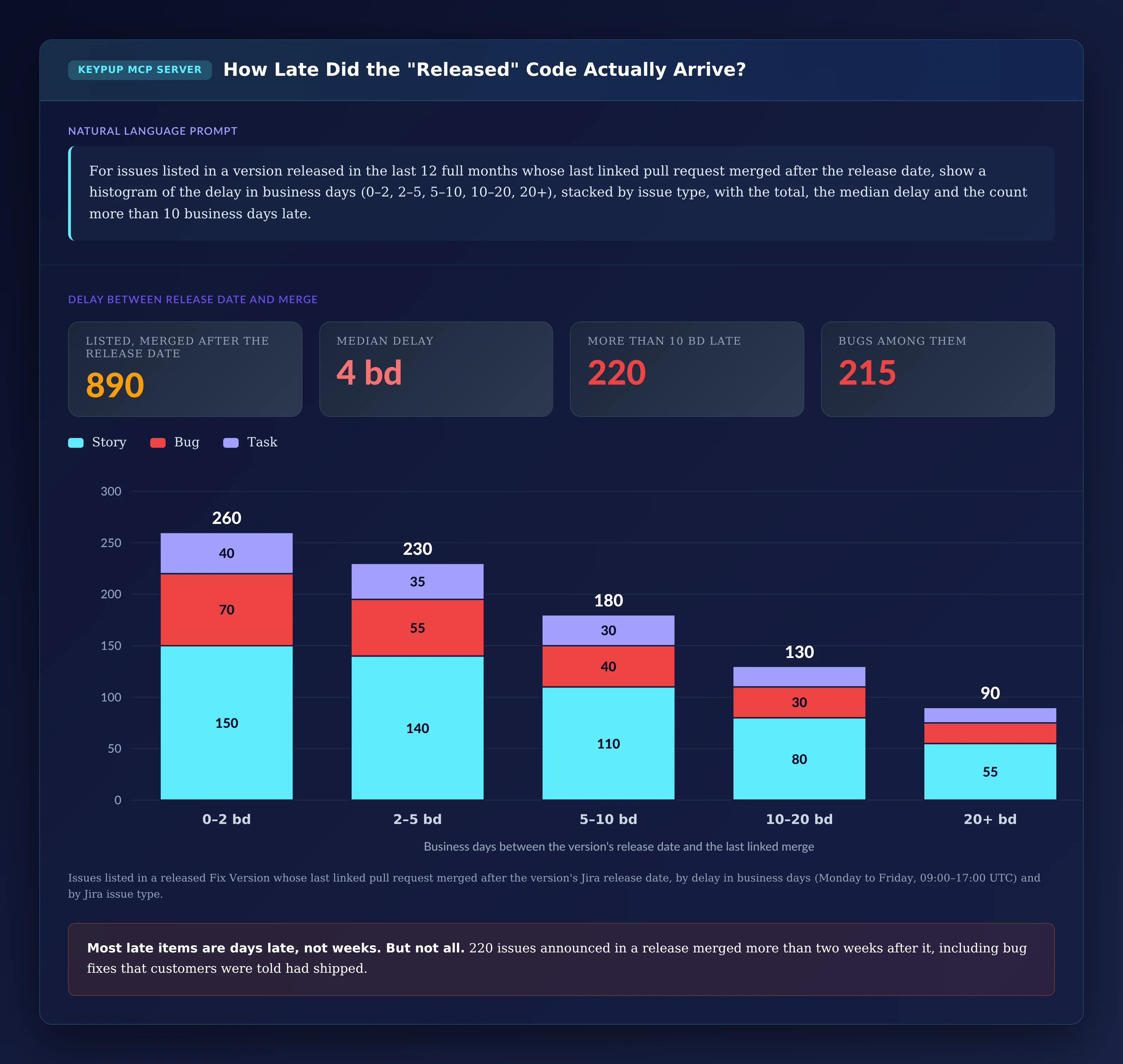
Issues merged after the release date aren't missing; they're late. How late tells you whether the release notes were slightly early or simply wrong.
MCP Prompt:
For issues listed in a version released in the last 12 full months
whose last linked pull request merged after the release date, show a
histogram of the delay in business days (0–2, 2–5, 5–10, 10–20, 20+),
stacked by issue type, with the total, the median delay and the count
more than 10 business days late.
Output: How Late Did the "Released" Code Actually Arrive?
Key Insight: Most late items are days late, not weeks: the median is four business days. But 220 issues announced in a release merged more than two weeks after it, and 215 of the 890 late issues are bugs, fixes that customers were told had shipped.
5. Checking Whether Last-Minute Additions Make the Release
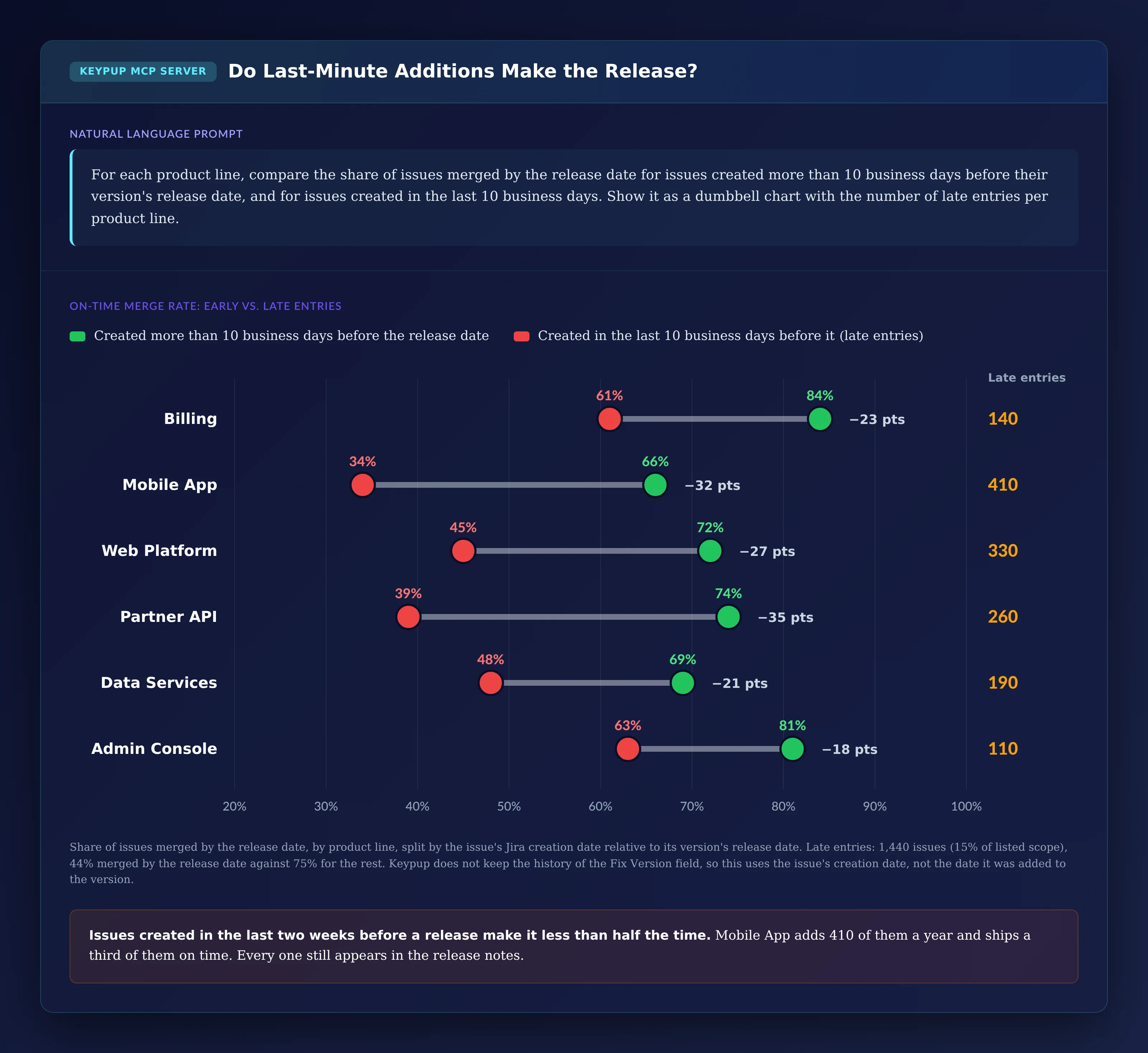
Issues created just before a release have the least time to get through review and CI. Comparing them with the rest shows how much of the drift they cause.
MCP Prompt:
For each product line, compare the share of issues merged by the
release date for issues created more than 10 business days before
their version's release date, and for issues created in the last 10
business days. Show it as a dumbbell chart with the number of late
entries per product line.
Output: Do Last-Minute Additions Make the Release?
Key Insight: Issues created in the two weeks before a release make it less than half the time: 44%, against 75% for everything else. Mobile App adds 410 of them a year and merges a third of them on time. One caveat: Keypup doesn't keep the history of the Fix Version field, so this uses the issue's creation date, not the date it was added to the version.
6. Finding Where Untracked Code Comes From
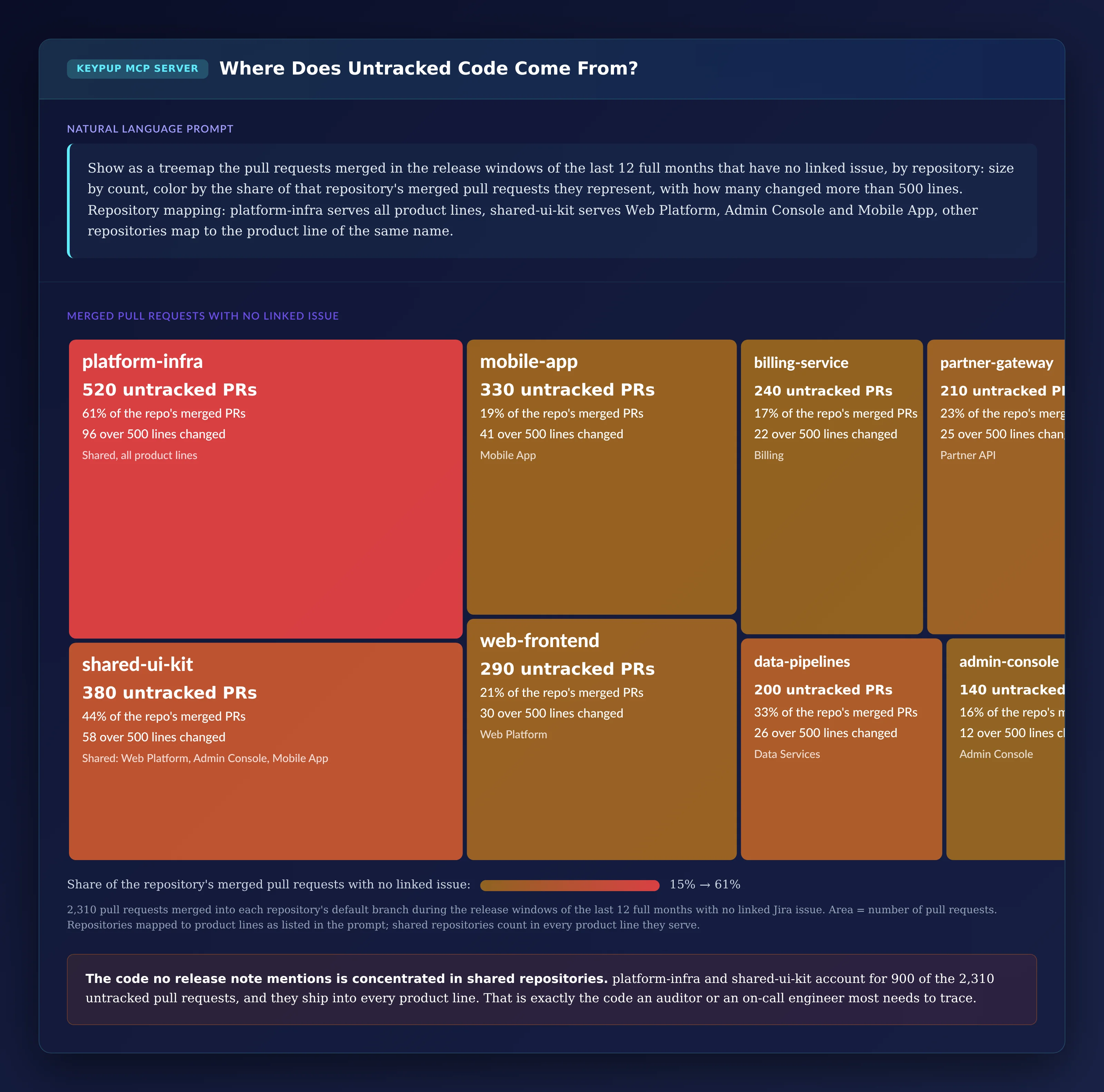
The other half of the problem is code that ships with no ticket. Knowing which repositories produce it tells you where to fix the process.
MCP Prompt:
Show as a treemap the pull requests merged in the release windows of
the last 12 full months that have no linked issue, by repository:
size by count, color by the share of that repository's merged pull
requests they represent, with how many changed more than 500 lines.
Repository mapping: platform-infra serves all product lines,
shared-ui-kit serves Web Platform, Admin Console and Mobile App, other
repositories map to the product line of the same name.
Output: Where Does Untracked Code Come From?
Key Insight: Untracked code is concentrated in shared repositories. platform-infra and shared-ui-kit account for 900 of the 2,310 untracked pull requests, and 61% of everything merged into platform-infra has no ticket. That code ships into every product line, and it's exactly the code an auditor or an on-call engineer most needs to trace.
7. Checking What Will Really Be in the Next Release
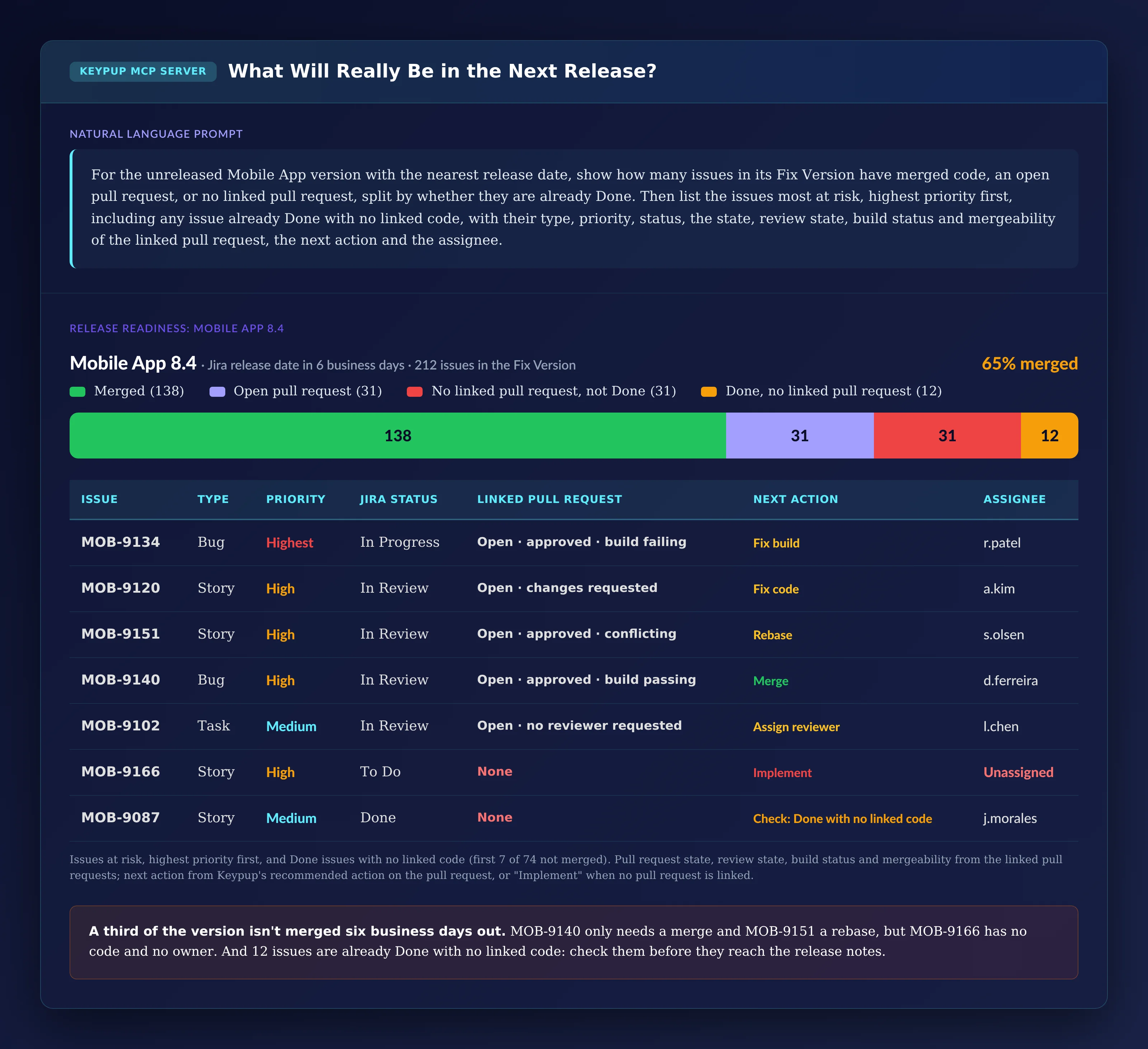
The last step turns the analysis into a pre-release check: before the notes are generated, what in the next version is actually merged, and what needs to happen for the rest?
MCP Prompt:
For the unreleased Mobile App version with the nearest release date,
show how many issues in its Fix Version have merged code, an open
pull request, or no linked pull request, split by whether they are
already Done. Then list the issues most at risk, highest priority
first, including any issue already Done with no linked code, with
their type, priority, status, the state, review state, build status
and mergeability of the linked pull request, the next action and the
assignee.
Output: What Will Really Be in the Next Release?
Issue
Type
Priority
Jira status
Linked pull request
Next action
Assignee
MOB-9134
Bug
Highest
In Progress
Open · approved · build failing
Fix build
r.patel
MOB-9120
Story
High
In Review
Open · changes requested
Fix code
a.kim
MOB-9151
Story
High
In Review
Open · approved · conflicting
Rebase
s.olsen
MOB-9140
Bug
High
In Review
Open · approved · build passing
Merge
d.ferreira
MOB-9102
Task
Medium
In Review
Open · no reviewer requested
Assign reviewer
l.chen
MOB-9166
Story
High
To Do
None
Implement
Unassigned
MOB-9087
Story
Medium
Done
None
Check: Done with no linked code
j.morales
Key Insight: A third of the version isn't merged six business days before its release date. MOB-9140 only needs a merge and MOB-9151 a rebase, but MOB-9166 has no code and no owner, and should be moved to the next version now rather than discovered after the release. The 12 issues already Done with no linked code need a check before they reach the release notes.
The Technical Implementation: What Keypup MCP Actually Reads
Every number above comes from fields Keypup already imports from Jira and your Git platforms. It helps to be precise about what they are, and what they depend on.
Release Scope Comes From the Jira Fix Version Field
Keypup imports each Jira issue's Fix Versions, with each version's name, release date and released flag, along with the issue's type, priority, status, creation date and assignee. The release date is the one set on the version in Jira: if your teams release on a different day and don't update it, the "merged by the release date" comparison uses the wrong date. Keypup stores the current Fix Versions of an issue, not the history of that field, so it can't tell when an issue was added to or moved out of a version.
Links Come From Issue Keys
"Merged code" relies on pull requests being linked to the issue, which Keypup does when the Jira key appears in the pull request title, or in its description or a commit message after a closing keyword such as "fixes". If your teams don't reference Jira keys consistently, linked issues will show as "no linked pull request" and their pull requests as untracked. Check the share of pull requests with a linked issue before reading the results.
Product Lines and Release Windows Come From Your Mapping
Keypup imports each pull request's repository, target branch, merge date and size. It doesn't know which repository feeds which product, so you give that mapping in the prompt. The assistant builds each release window from the release dates of consecutive versions of the same product line, and counts merged pull requests into the default branch (or the branches you name) inside that window.
Readiness Comes From Pull Request State
For each linked pull request, Keypup imports its state, review state, build status and mergeability, and computes a recommended next action such as review, fix the build, rebase or merge. That's what lets the assistant say what each unmerged issue needs before the release date.
What Keypup Doesn't See
Keypup doesn't import deployment events, release branches as a release object, or your release notes themselves. "Merged by the release date" means the linked code reached the target branch by the date set on the Jira version; it doesn't prove the build containing it was deployed. If you cut release branches or deploy on a different schedule, use the cut date in your prompt instead of the Jira release date.
Real-World Impact: Enterprise Case Studies
Case Study 1: Global Logistics Software Provider
Before Keypup MCP:
1,100 engineers, five product lines, monthly releases with customer-facing release notes generated from Jira
Repeated escalations from customers about fixes "announced but not shipped"
No way to answer "what changed in this release" for platform repositories
After Keypup MCP:
The scope reconciliation became a release gate: three business days before each release date, issues without merged code are moved to the next version before the notes are generated
Late additions were capped: issues created in the last two weeks before a release go into the next version by default, unless they're Highest priority
Platform teams adopted Jira keys in pull request titles, which brought the share of untracked merged code in shared repositories from over half to under a fifth in two quarters
"We used to argue with customers about whether a fix had shipped. Now we check the version against the merged code before we publish anything. The release notes got shorter, and they stopped being wrong."
— VP Engineering, Global Logistics Software Provider
Case Study 2: European Health-Tech Platform
Before Keypup MCP:
650 engineers, regulated change management, the Fix Version used as audit evidence
Auditors finding merged changes with no ticket in sampled releases
Large quarterly releases with scope set at planning and rarely revised
After Keypup MCP:
The untracked-code treemap identified two shared repositories responsible for most changes with no ticket; both now require a Jira key before merge
The size scatter made the case for smaller releases: the organization moved from quarterly to monthly versions, and the share of scope merged by the release date rose with it
The readiness check runs weekly in the release meeting, with each at-risk issue given an owner or moved out of the version
"Our audit trail was the Fix Version, and it was a plan, not a record. Reconciling it with the merged code gave us evidence that matches what's actually in the release."
— Head of Quality and Compliance, European Health-Tech Platform
Implementation: Getting Started with Keypup MCP
1. Connect Jira and Your Git Platforms
Connect Jira and GitHub, GitLab, Bitbucket or Azure DevOps to Keypup. Issues, versions, pull requests and reviews are imported automatically.
2. Check Your Version Hygiene
Make sure each product line uses Jira versions with a release date that matches the day you actually release, and that versions are marked released when they ship.
3. Check How Many Pull Requests Reference an Issue Key
Ask your assistant for the share of merged pull requests with a linked issue, by repository. Where it's low, the results describe your linking practice as much as your releases: fix that first.
4. Write Down Your Repository Mapping
List which repositories feed which product line, including shared repositories, and which branches count as "merged". You'll paste it into your prompts.
5. Make It a Pre-Release Ritual
Connect the MCP server to your AI assistant using the MCP documentation, run the readiness check a few days before each release date, and the scope reconciliation monthly for leadership.
Frequently Asked Questions
What is a Fix Version in Jira?
A Fix Version is a Jira field that records which release an issue is planned to ship in. Versions have a name, a release date and a released flag, and release notes are often generated from the issues in a version.
Why don't release notes match what actually shipped?
Because the Fix Version is set when work is planned and rarely updated when it slips, while code is merged on its own schedule. Issues whose code missed the release stay in the version, and changes merged without a ticket appear in none.
How do you check a Jira release against merged code?
Link pull requests to Jira issues through the issue key, then compare, for every issue in the version, the merge date of its linked pull requests with the version's release date. Count merged pull requests with no linked issue in the same window to see what the version is missing.
How do you reduce untracked changes in a release?
Require a Jira key in pull request titles, especially in shared and platform repositories, and measure the share of merged pull requests with a linked issue by repository so you can see where the practice is slipping.
The Bottom Line
A Fix Version is a plan. Release notes, change records and audit evidence treat it as a record. Unless someone checks it against the merged code, it lists work that didn't ship and misses work that did. Keypup MCP makes the gap visible:
✅ Reconciling each released version with its merged code, in both directions ✅ Tracking whether release scope is getting more or less accurate ✅ Finding which releases and product lines drift furthest ✅ Measuring how late "released" code actually arrived ✅ Showing how often last-minute additions make the release ✅ Finding where untracked code comes from ✅ Checking what the next release will really contain, issue by issue
Compare the 6 best engineering metrics software for fast setup in 2026 — Keypup, LinearB, Swarmia, Jellyfish, Faros and Harness SEI — across setup speed, integration overhead, dashboard flexibility, delivery metrics coverage, AI capabilities and data security. Find out which platform gets a mid-market engineering team from connecting Git and Jira to actionable delivery metrics in minutes, not months.
Your bug SLA report says 91%. Your customers experienced 65%. Learn what engineering leaders on Reddit say about P1 fix-time targets, SLA clocks that start late and bugs closed to stop the timer at enterprise scale, and how Keypup MCP measures real SLA attainment by priority and team from Jira workflow history and linked pull requests.
Dependabot and Renovate open thousands of pull requests across enterprise repositories, and most of them are never merged, merged with no review, or left open for months. Learn what engineering leaders on Reddit say about dependency bot noise, unowned major upgrades and auto-merge risk, and how Keypup MCP measures the bot backlog by version bump, ecosystem, merge path, next action and owner.